.

Tuesday, 18 November 2014

PHP Frameworks, which to choose in 2014? A comparison

As a PHP developer, we often get bored with one PHP framework and looks for some advanced feature rich framework which can make life easier. To explain briefly about framework;  a framework provides a set of functions and classes to help developers write code faster and more structured.

Most of them implement certain design patters, of which MVC is by far the most popular. The main aim of MVC is to separate the database related code (Model) from application-specific code (Controller) from its html (View). It also features a URL-mapping system to create search engine friendly “clean url” and to separate the code-files from the actual urls. But there is a much discussion all around because some prefer performance, some prefer better documentation, some prefer amount of built-in functions etc. Today here in this article, I am going to discuss some featured PHP frameworks which surely help you to choose best for your next project.

Zend Framework


We all familiar with Zend framework which is a first choice of most of developers. It has a loosely coupled architecture which allows developers to use components individually. Actually the component structure of Zend Framework is somewhat unique and each component is designed with few dependencies on other components.
Zend Framework is still a choice of most of developers which offers a robust, high performance MVC implementation, a database abstraction that is simple to use, and a forms component that implements HTML form rendering, validation, and filtering so that developers can consolidate all of these operations using one easy-to-use, object oriented interface. Few other components, such as Zend_Auth and Zend_Acl, provide user authentication and authorization against all common credential stores. It also provides many useful component which you can use according to your application need to reduce development time.

CodeIgniter


Codeigniter is also a lightweight PHP framework with mvc pattern. It’s a choice of most of php developer. It’s relatively easy to learn. Feature wise, Codeigniter is powerful frameworks such as Zend and Cake. Its major goal is to enable you to develop projects much faster than you could, by providing a rich set of libraries for commonly needed tasks, as well as a simple interface and logical structure to access these libraries.

Symfony


Symfony is a recognized PHP Framework with some awesome feature. Symfony is aimed at building robust applications in an enterprise context, and aims to give developers full control over the configuration: from the directory structure to the foreign libraries, almost everything can be customized. To match enterprise development guidelines, Symfony is bundled with additional tools to help developers test, debug and document projects.
Many developers say that Symfony is slower for small websites because of the weight of the framework. A lot of code must be executed for each request. But I think it still be a best choice for large projects. It’s a stable open-source just like Zend, so you can go with it without any hesitation.

Yii Framework


Yii is a popular high-performance PHP framework best for developing Web 2.0 applications. Yii comes with rich features like MVC, DAO/ActiveRecord, I18N/L10N, caching, authentication and role-based access control, scaffolding, testing, etc. It can reduce your development time significantly.
Yii only loads the features that you need. It has powerful caching support. It is explicitly designed to work efficiently with AJAX. Security comes as standard with Yii. It includes input validation, output filtering, SQL injection and Cross-site scripting prevention. All features are encouraging, so yii also be a good choice.

Kohana


An elegant HMVC PHP5 framework that provides a rich set of components for building web applications. It’s a fork of Codeigniter. With Kohna, each website needs a different Kohana “installation”. However it is just a server setup check. Not difficult or special. Kohana works with the MVC-concept incl. mapping.Configuration is mainly in application/bootstrap.php and modules/…/database.php. It is lightweight and fast. It all seems nice and clean, so you can go with it.

Laravel


Laravel is a new name in web application framework with expressive, elegant syntax. It’s also worth checking as it aims to make the development process a pleasing one for the developer without sacrificing application functionality. It provides powerful tools needed for large, robust applications. It also give superb inversion of control container, expressive migration system, and tightly integrated unit testing support give you the tools you need to build any application with which you are tasked.

CakePHP


CakePHP is a popular framework for web application development. It’s a feature rich light weight PHP framework comes with a lot of features like code generation, translations, database access, caching, validation, authentication etc.

Final Thoughts

There is a long list of PHP framework, but I have analysed some of them. As you have seen that Zend and Symfony are full of functionality but not suitable for small projects. Codeigniter and Lavarel attract more because they are lightwieght and suitable for all kind of projects. So you can give Codeignitor and Lavarel a serious try. Also you can check out for Kohana. If you are looking for well establish PHP framework for large project then Zend and Symfony would be best choice. So enjoy this and don’t forget to give your input via comments, Thanks!

Latest Features for Magento Community Edition 1.9 and Magento Enterprise Edition 1.14

Magento is by far the most widely used ecommerce solution and it keeps getting better by the day with new technology enhancements added to make it a robust, new age and sustainable solution. The field of ecommerce has seen a transformation recently with more and more businesses moving towards an online presence and opting for Magento web development. The transformation got even better with the mobile technologies that swept the market. Today ecommerce solutions need to have a mobile readiness too!
Magento has announced its latest releases for CE and EE versions and they include all the features an ecommerce site would require to increase sales, capture new customers and go responsive too! The latest releases of Magento are:
  • Magento Community Edition (CE) 1.9
  • Magento Enterprise Edition (EE) 1.14
Both these come with a host of new features.
PHP, Zend Framework Updates and higher Apache Solr version support

Both EE 1.14 and CE 1.9 versions of Magento include major technology updates that give it that extra appeal. Magento development professionals are already enthusiastic about using these features to provide customers with exemplary features for their online stores.
Built to be Responsive – Mobile Ready

The new releases for community and enterprise edition of Magento incorporate a responsive default theme, making them mobile ready effortlessly. Online store owners do not require to Hire Magento Developers separately to make their website responsive and mobile friendly.
  • A mobile ready site can be made up and running in half the time and resources giving you ample marketing time. Without extra expenses on responsive Magento web development.
  • You are better equipped to stand out in the fierce and rapidly growing mobile commerce competition. 
  • Presents merchants with new opportunities with less expensive maintenance.
  • SEO (Search Engine Optimization) benefits can also be derived from a responsive website. 
  • The new Magento responsive themes uses Sass or Compass which is a CSS pre compiler and provides organizable and reusable CSS, JQuery for all the custom java scripts in the responsive theme and some additional JavaScript libraries too.
Cross Border Trade / Price Consistency
Merchants can take advantage of the Price Consistency model and maintain the same prices across a large customer base whose taxes differ and are not same as the store tax rates.
  • This feature is advantageous for merchants operating in diverse geographical locations and for those who wish to show a single price to all customers. 
  • Store Owners get a clutter free pricing structure, regardless of the tax structure that varies from county to country.
  • NOTE: this feature is available for the EU (European Union) merchants and the prices must be displayed inclusive of the taxes.
Breeze through the checkout process and increase sales!

Checkout process is very crucial for any online store. It decides whether you finally made that sale or not! Making it easy, convenient and appealing to a customer is always the prime focus of a Magento Developer. The new Magento EE and CE releases include the following enhancements to the checkout process:
  • Ajax is used to enable users to change the quantity of items in the shopping carts without refreshing the page – a very desirable feature from a sales perspective. Users generally lose patience at this stage and the result is – an abandoned cart! Well, with the new Magento, this will be handled.
  • Introducing the new payment scheme for customer’s convenience – “Bill Me Later” this option enables the customer to pay for the purchase within the next 6 months. Merchants get paid up front. Merchants need to pay only the regular PayPal transaction fee. 
  • Bill Me Later is estimated to result in 18% increase in sales.
  • The new and improved checkout process enables customers to select an alternative payment mode in case the credit card processor fails.
  • A few steps in the checkout process can be eliminated by the merchants to improve customer experience. Merchants can disable the Order Review page (or enable it if they require so) and also eliminate the necessity of “Update Order” before proceeding to “Place Order”. This drastically reduces the checkout process and users can breeze through the check out process very fast and without unnecessary complications!
Solr Search Engine Changes – Magento EE only

Indexing improvements have been added to Solr in Magento Enterprise Edition 1.14. The indexing is now done automatically in the background as and when the product catalog changes. Shoppers see the most updated search results and hence customer experience is greatly improved.
Other than these, Magneto EE 1.14 has a lot of security enhancements and have closed many security vulnerabilities from the previous versions.
The new Magento is packed with features for a new technology revolution in the ecommerce world. It’s time for you to catch up and derive the advantages from these and see the difference in conversions, sales and overall business growth!

30 Essential Free Magento Extensions

Magento is a popular open source platform to built your ecommerce website. It is based on Zend Framework and has a very flexible architecture. Although it is much younger than many of its competitors, Magento has a large community of users.
Developers can easily built plugins or templates for Magento, which makes it more and more popular among open source ecommerce solutions. here are loads of great extensions for Magento to help take your internet store to the next level.
1. Remerce CMS Meta Robots 

Set the Robots Meta Tags for Cms pages
This module add the option to set the Robots Meta for CMS pages.

Go to CMS =>Manage Pages

Select a page and go to the tab "Meta Data" Under Robots you can set the Robots Meta Tag

2. Fooman Google Analytics Plus
This is a beta release - please report how this extensions works for you.

Current improvements:

    * * Track every individual page - including sections retrieved via AJAX during one-page-checkout
    * * Track the actual typed in keywords by your user (this might not yet work due to a bug in Magento itself)
    * * Temporary solution to make your Magento install SEO friendlier via robots.txt
{ads1}
3. Canonical URL's for Magento 
This extension adds the new canonical links to the head of your Magento pages, for a more in-depth explanation, see Yoast.com. More about Magento SEO in general at Yoast.

Note
For the new way the module gets the canonical URL at product pages it is important that Mage::getSingleton('catalog/url')->refreshRewrites(); is executed. Normally this will happen with the install of the module but please check the canonical url at your product page. If you get a 404 for this url change change the value of "add category to product url" at your backend, save, change it back and save again. Now the url shouldn't give a 404 error.

4. Advanced Sitemap 
how a list of product from current store

0.1.4
* Add parent category

CHANGES:
->U app/design/frontend/default/default/template/catalog/product/productlist/category.phtml

5. Blog  

A blog can be a great way for an online store to connect with customers, and this Magento extension makes it easy for you to incorporate a blog into your internet shop.  Are you already using the Monk_Blog extension for your store’s blog?  Well, Blog is compatible with Monk_Blog, so this Magento extension can integrate all of the information from your old blog into your new one (make sure you follow the directions closely).

6. Post Affiliate Pro Connector 
An affiliate scheme can be a great way to increase your ecommerce site’s sales, and the Post Affiliate Pro Connector extension instantly integrates Post Affiliate Pro (PAP) into Magento.  This extension for Magento automatically handles click and sale affiliate tracking, tracks affiliate sales using Javascript or PHP API, accepts referrals to any page of your online store, and much more!

7. IW PayPal Standard Currencies 
This Magento extension lets you choose any PayPal supported currency for your online store’s transaction currency and add new PayPal supported currencies to the PayPal Website Payments Standard payment method in your shop’s admin panel.  With the IW PayPal Standard Currencies extension, you can use any base currency for your online shop, allowing your store to have customers almost anywhere in the world.

8. J2T Points & Rewards
This module allow the customers do gather points on products they are buying.
The points can be redeemed for discount on their purchase.

Upon installing this module, you need to create a shopping cart promotion named 'points' and an attribute called 'reward_points'.

You can specify an amount of point for a product, or let the system do the job.
You can configure the module by updating the values in : System > Configuration > Reward Points.

9. Google Maps Store Locator 
To include the map in your CMS page/block use this snipped:
{{block type="core/template" template="unirgy/storelocator/map.phtml"}}

Copy to your theme and design the following interface files:
layout/ustorelocator.xml
template/unirgy/storelocator/map.phtml

If you are importing locations directly to database, go to this URL to fetch coordinates:
http://your.store.com/ustorelocator/adminhtml_location/updateEmptyGeoLocations

10. BouncingOrange TinyMCE (WYSIWYG) 
TinyMCE is fully configurable (without modifying any code file) in the administration configuration (System -> Configuration / Admin / WYSISYG Editor (TinyMCE)).

You can activate TinyMCE for the following textaera :
- Product Description
- Product Short Description
- CMS Page Content
- Static Block Content
- Category Description
- Newsletter Template

11. Fontis WYSIWYG Editor 
This extension gives you the option to enable a JavaScript WYSIWYG editor to specified admin pages. Currently available editors are: TinyMCE and FCKeditor.
For more information, including screenshots, version history and instructions on configuration and usage, please see the Fontis WYSIWYG Magento extension page.

12. Magento Live Chat 
This free module will provide LiveChat support in Magento.
It don’t depends third party platform
It don’t require to fill a form before start a conversation
It identify automatically registered user
It provide information about the current page of the customer
It can provide useful information about transformation rate
Conversation are archived and available forever

13. Fontis SecurePay 
Please note that this extension uses the Australian SecurePay found at www.securepay.com.au.

Payments made with this payment module are processed through the SecureXML gateway.

For more information, including screenshots, version history and instructions on configuration and usage, please see the Fontis SecurePay Magento extension page.

14. Royal Mail Domestic and International Shipping 
Is your online store based in the UK?  If you sell tangible items to customers in the UK and beyond, then check out the Royal Mail Domestic and International Shipping extension for Magento.  This extension calculates the cost of sending items to a variety of different destinations using a range of various shipping methods.


15. Checkout Newsletter 
A regular newsletter is a great way of telling your customers about your latest sales, newest products, and special offers.  Checkout Newsletter is a super simple extension for Magento which allows you to add a ‘Sign Up for Newsletter’ checkbox onto your Onepage Checkout Page.  With Checkout Newsletter, your customers can sign up for your company’s newsletter with just a click of there mouse!

16. Lazzymonks Twitter  
Completely rebuilt to integrate better with magento. All the problems experienced with the earlier version have been fixed in this release.

You can set it to be in either the left menu, right menu or both. The number of updates to display is also adjustable.

Status updates can be posted from within the admin panel.

17. Events Calendar 
With this extension, you can display an events calendar on your website. Events are stored in the database. You can also display the upcoming list of events quickly by calling a block in your template.

Before entering any events, go to System->Configuration->General->Events Calendar and set your timezone.

Get the callendar using this {{block type="mathieufeventscal/events" template="mathieuf/eventscalendar/events.phtml"}}
Get the events list using this {{block type="mathieufeventscal/events" template="mathieuf/eventscalendar/nextevent.phtml"}}

18. Customer Groups Configurable Catalog 
This extension is a lot more flexible then the Netzarbeiter_LoginCatalog and
Netzarbeiter_CustomerActivation modules, but it is also more complex.
I suggest not installing this extension together with Netzarbeiter_LoginCatalog,
as that doesn't really make sense.

Release 0.2.5beta and above works with and without the flat catalog enabled

19. Exploded Menu 
Replaces the standard Magento menu with a multi column drop down menu system. This is a community version of the Supermenu extension. The screenshots say it all ... Allows you to display your product categories in a more intuitive manner. Similar to the functionality used on top ecommerce sites like www.asos.com

20. Magento EasyLightbox 
Want a free and easy way to improve the appearance and functionality of your Magento site?  Then try Magento EasyLightbox, an extension that displays an image (i.e., your store’s products) as a lightbox.  Magento EasyLightbox takes about 5 minutes to install and configure, and you don’t need any coding experience! This is a great extension for just about type of online shop.

21. Fooman Invoice=Order Number  
Love using Magento for your online store but hate how it creates separate invoice, shipment, and creditmemo numbers for one order?  Then start using Fooman Invoice=Order Number, a free extension for Magento.  Instead of keeping separate counts for invoice, shipment, and creditmemo numbers, this extension uses the related order number, making it easier for you to track of all of the numbers related to an order.

22. Magento jqZoom  
Magento provides users with an image gallery to help display their products in an attractive and interesting way.  Magento jqZoom, an extension for Magento, can make your online store even more dynamic, because it replaces Magento’s regular image gallery with the jqueryZoom widget.  This widget will allow your clients to hover over images of your products and show them in zoom view without having to use controls.

23. CLS Upgrade-proof Email Templates   
Looking for an upgrade-proof way to change your email templates for Magento?  Then give the Magento extension ‘CLS Upgrade-proof Email Templates’ a try!  Instead of having to directly change the default email templates for Magento, this module allows you to store your customized email templates in a custom theme directory which will override the default template.

24. Teaserbox  
Some tiny but nice features come with the Magento Teaserbox extension - below you will find a complete list of features which are supported within this product.

Image gallery
Sliding direction
Define Teaserbox proportions
....

25. IDEALIAGroup LightBox for Magento  
IDEALIAGroup LightBox is UPDATE SAFE since no system files are replaced or modified and you can enable or disable it in a click.
FEATURES
1 - FULL MAGENTO BACKEND INTEGRATION: all parameters available in configuration (no coding needed)
2 - Configurable effect duration
3 - Support for thumbnails and base image: default double-click zooming of base image is automatically replaced and integrated
4 - Full styles configuration: assets colors, fonts and borders can be easily configured

26. Magento EasyTabs  
This small extension will help to add informational tabs on product page. Installation and configuration will take approximately 5 minutes. No files are replaced and no codding experience needed to install!

1.Install extension using magento connect.
2.Log out from admin and login again.
3.Navigation to System > Configuration > Templates-Master > EasyTabs and enable extension for any store you need.

27.  MagentoConnect Manager  
One of the first things that really confused me when i start using Magento is Magento connect. I just started learning things, so i was looking for some plugin examples. I visited Magento connect page with extensions and looked for download button, instead i found “Get extension key” one.
You can also automatically upgrade your Magento installation through connect manager with key

magento-core/Mage_All_Latest

28. osCommerce Migration Tool  
Now, available for download through Magento Connect, is a new extension for DataFlow which enables importing your data from osCommerce into your website in Magento.

To set up a profile, all Magento needs is information such as the IP/host of your osCommerce DB, user login and name of DB. Magento will take care of the rest. The data Magento supports is the default DB of osCommerce 2.2 RC2 which includes customers, orders, categories and products in multiple languages.

29. MostViewed module  
Magento MostViewed module automatically generates the list of your online store's most viewed
products and displays it at the home page (or some other page) in the customer area. All that you need - add the "mostviewed/list" block to the home page. You can do it at the CMS->Manage Pages page in the admin area. Simply add the following line to the content of page:
{{block type="mostviewed/list" name="home.mostviewed.list" alias="product_homepage" template="catalog/product/list.phtml"}}

30. Vertical Navigation with CSS Classes  
With this extension you're able to design you own vertical category navigation with subcategories and product count display.

Each element has a fine css'ing so you can address each element or group exactly including "first" and "last" element per group and "previos", "activ" and "next" child.

The module removes the top.navigation via XML-Update and places the vertical nav in "left" structural block. You can change this by modifying the vertnav.xml file.

 Thank you ! you can ask me at praphullpriyadarshi2012@gmail.com if any query .

Configuring multilanguage site VirtueMart 2.x.

This tutorial is going to help you with setting up Joomla 2.5.x and VirtueMart 2.0.x for multiple languages.
  1. First of all, you need to setup multilanguage on your Joomla 2.5.x site using a tutorial at Joomla 1.7-2.5. Configuration multilanguage site (it shows how to download and install a new language pack, enable the language switcher module and create menus for both languages. For this tutorial, just make sure that you have downloaded and installed the new Joomla language pack from http://extensions.joomla.org/extensions/languages/popular/).
  2. Download the necessary VirtueMart language pack from http://gruz.org.ua/en/virtuemart-language-files.html http://gruz.org.ua/en/virtuemart-language-files.html
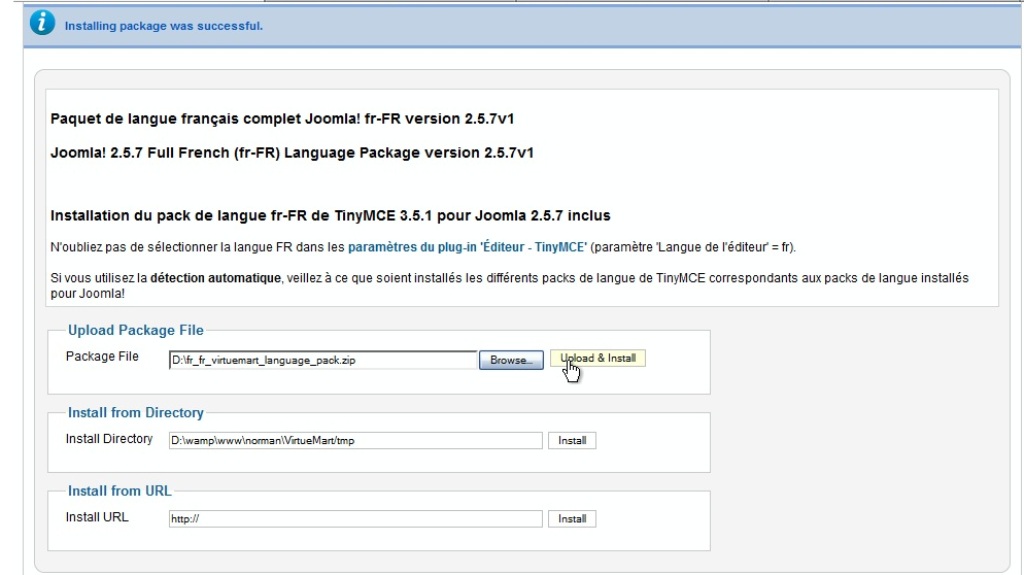
  3. In your Joomla admin go to the top menu Extensions -> Extension manager. Under Upload Package File clikc Browse and navigate to the language pack zip file on your computer. Click Open, then Upload and Install to install it.


  4. Now if you go to the menu Extensions -> Language Manager, check the new language and click Default

  5. and open the front page of the site, it will look like this:

    This means the products and categories are currently added to the English version of the site, so you need to add them to the new language version again.
  6. Before this, first go to th menu Components -> VirtueMart and select Configuration from the left side menu Configuration.

  7. Under the Shop tab click the filed called Multilingual shop.

  8. If you installed the virtuemart language pack correctly, there you should see two lanaguages. Click Select all options and click Save.
  9. Now you can add the translations. In your Joomla admin go to Components menu -> VirtueMart. On the left click Products -> product Categories.

  10. If your new language is still set to default, you will see no categories there. Switch it back to English in order to re-enable the products and categories. Now, if you click on any category, you will see a drop-down menu that allows you to switch between the languages easily.

  11. If you switch to the new language, you will see this message:


  12. Click “Ok”, add the translation and click Save.
  13. Go to Products menu -> Products, select any product, switch to the new language. You will see the same waring about the missing translation,

  14. Add the trsnaltion and click Save
  15. Now, if you go to Extensions -> Language manager, set your new language as default and open your site, you will see the product and the category you added.

  16. Proceed to adding translations to the rest of the categories and products of the new language as well as adding copies of the modules that are currently available for the English version only to make the both versions look identical.

How to set multiple stores/websites with one magento installation on different domains

This article will describe quickest way how to use and configure one Magento installation on different domains.
Point here is what do you want to have on that different domains, for example you want to have chosen categories/products on one domain and the other one will be on different language.
First you figure that and then go to configuration.

So for each domain you need to create webiste in main Magento admin installation:
System > Manage Stores > Create Website
For Name: you enter name of you desired domain (“my.website.com”)
For Code: you will enter identifier for that domain (“my_website_com”)
After that you will go to:
System > Manage Stores > Create Store
For Website: you will select “my.website.com” from dropdown menu.
For Name: I like to enter same as website (“my.website.com”) so I know for which website this store is but you can put here whatever you want.
Now for the Root Category: if you whish to have different menu for that website you will need to create new root category under
Catalog > Manage Categories > Add Root Category
in which you will put categories for that website.
And in the end you need to setup Store View under:
System > Manage Stores > Create Store View
Under Store: select “my.website.com” from dropdown menu.
For Name and Code enter “my_website_com”
And for Status: “Enabled”
If you wish to have diiferent language on that wesite you will need to change that on
System > Configuration
Under Current Configuration Scope: select your website/store from dropdown (“my.website.com”)
Under General tab go to
Locale Options and for
Locale choose language from dropdown (don’t forget to install language pack).
To run Magento on your different domain you need only two files:
.htacces
index.php
Open “index.php” and modify line which begins with “$mageFilename”
so it goes something like this:
$mageFilename = 'path_to_your_real_magento_installation_dir/app/Mage.php';
and line:
$mageRunCode = isset($_SERVER['MAGE_RUN_CODE']) ? $_SERVER['MAGE_RUN_CODE'] : '';
replace with:
$mageRunCode = isset($_SERVER['MAGE_RUN_CODE']) ? $_SERVER['MAGE_RUN_CODE'] : 'my_website_com';
Now you will also need media, skin and javascript files so you can also copy them into root folder of your new domain or you can set it from Magento admin:
Under Current Configuration Scope: select your website/store from dropdown (“my.website.com”)
Go to Web tab and under Secure and Unsecure you need to modify:
Base Skin URL (example: http://real.website.com/skin/)
Base Media URL (example: http://real.website.com/media/)
Base JavaScript URL (example: http://real.website.com/js/)
That’s it.
Enjoy coding!


How to change the Default Currency in VirtueMart for Joomla 2.5

During our testing of VirtueMart, when we added our first product we entered the price under the assumption it would be listed using the American Dollar format. As you can see from the screenshot below, VirtueMart for Joomla 2.5 is setup by default to use the Euro instead of the American Dollar.

If your primary customers will not be using the Euro, for customer usability purposes you'll want to adjust the default currency of your VirtueMart store. In this tutorial, we'll show you how to change your store's default currency.
To configure the default currency in VirtueMart:


  1. Log into your Joomla Dashboard
  2. In the top menu, hover over Components and click VirtueMart
  3. Click the Shop icon
  4. There are three tabs listed: Vendor, Additional Information, and General User Information. Ensure you are under the Vendor tab by clicking Vendor.
  5. In the top right menu, click Save. When you visit your VirtueMart store, you will now see the currency listed as the currency you selected!
  6. Towards the right of the page, you will see a heading labeled Currency, and under that another option that says Currency. Using the drop down menu next to Currency, select your default currency. In our example, we selected United States dollar.

How to Create Multilingual Website in Magento

Creating a multilingual website is always a welcome and much useful thing to site owners especially who have global customers. However, some of them may not know how to effectively and easily create the same for their Magento powered website. Today, in this tutorial, I’ll guide you with the process for setting up a multilingual website in Magento.
The following step guide will help you to establish 2 multilingual stores on a website and by adapting the same technique you can set up multiple languages on the site without any hassles.
Login to the admin panel.

Go to System –> Configuration and click on Manage Stores
Click Create Store View button on left corner. It will redirect you to New Store View page.
Enter the field Name and Code as (e.g.) French and click button Save Store View
Now the French Store is created.
How to configure the store in the admin?
Go to System –> Configuration and select Current Configuration Scope:
Select French option in right side and click tab General –> General
Then click second group tab Locale Options
Locale field is in disabled mode, before that uncheck the Use Website select box.
Now Locale field is enabled, then select the French (France) option and save it.
Magento Translations:
 Go to Magento site to download the language pack.
Select any language  for example I have selected French (France) package.
Download the package and keep it your system,
Go to Magento site admin panel. Magento Connect
Installation path System → Magento Connect → Magento Connect Manager
Login to Magento Connect Manager panel with username and password.
Direct package file upload:
Choose the downloaded file (fr_FR.zip) and upload it.
Then Click refresh button in the panel and click the link Return to Admin.

.

Popular Posts

Powered by Blogger.